Executive summary
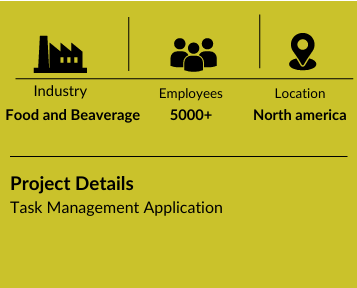
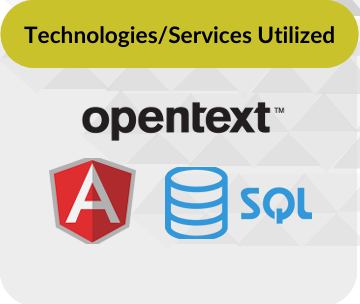
A prominent beverage company implemented a Resource Management Module to improve how resources were allocated within its Task Management Application. The module replaced manual, Excel-based processes with an automated system, enabling real-time tracking of resource availability and better task prioritization. Built using AppWorks, Angular, and SQL Server, the solution introduced features like resource simulation, bulk updates, and email notifications, making it easier to manage tasks and schedules. The user friendly interface enhanced efficiency, improved resource utilization, and resolved conflicts, laying the groundwork for future upgrades and capabilities.
Challenges
The beverage company faced challenges in managing resource allocation for its Task Management Application users using a manual, Excel-based process. Exporting data from the Task Management Application web application and importing it into Excel for resource management was time-consuming and prone to errors. Tracking resource availability and handling conflicts was difficult, leading to inefficiencies and delays in prioritizing and scheduling projects. The lack of automation made it challenging to monitor user availability, book time off, or simulate task adjustments, highlighting the need for a streamlined, efficient resource management system.
Objectives
The primary objectives were to streamline and optimize resource allocation within the Task Management Application application. The goal was to track weekly resource availability, allowing users to view availability percentages for individuals and manage time-off bookings for one or multiple users. Additional aims included enabling data filtering by roles, subgroups, and time periods, simulating the impact of task adjustments on resources, resolving conflicts, prioritizing projects effectively, and ensuring sufficient resources were available to meet project commitments.
Value Proposition
- Streamlined resource management.
- Weekly resource visibility.
- Simplified user scheduling.
- Balanced task allocation.
- Impact analysis tools.
- Role and subgroup focus.
- Improved task scheduling.
- Proactive user updates.
- Intuitive system navigation.
- Supports feature upgrade
Results
- Weekly Resource Availability Tracking: The system tracks the total resource availability on a weekly basis, providing clear insights into the current capacity of resources. This allows managers to make timely adjustments and plan more effectively.
- Individual User Availability Percentages: Users can view the availability percentage for each individual resource, helping to manage workloads accurately and ensure that team members are not overburdened
- Real-Time Resource Utilisation Tracking: The system provides continuous monitoring of resource availability and utilization, allowing managers to ensure that resources are being used effectively and identify any underutilized or overloaded resources.
- Conflict Resolution for Overloaded Resources: Identifies task allocation conflicts where resources exceed 100% capacity and helps reassign tasks, reducing overload instances by 30%.
- Weekly Resource Availability Tracking: Tracks 100% of resource availability within the application, updated on a weekly basis, ensuring comprehensive visibility for effective planning.
- Efficient Time-Off Booking: Users can easily book time off for one or multiple team members, ensuring that resource availability is updated in real-time and that managers can adjust workloads accordingly to accommodate these changes.
- Handling Resource Conflicts: The system checks for potential overloads, alerting managers when resources are assigned tasks beyond their availability. This feature helps to proactively resolve conflicts and prevent overworked resources.
- Detailed Resource Metrics and Reports: The system provides key metrics and statistics for resource allocation, offering valuable insights for managers to optimise team assignments, project timelines, and overall resource efficiency.
- Simulated Resource Date Changes: The simulation feature allows users to evaluate how changes in task dates will affect resource allocation. This helps managers adjust schedules and make data-driven decisions to ensure resources are available for critical tasks.