
We Stopped Writing Code for Tickets.

A Plane ticket gets the ai-ready label. A webhook fires. Claude Code picks it up, reads the codebase, writes the code, runs tests, self-heals if they fail, and opens a merge request on GitLab.  We review the MR. That is it.

No copy-pasting prompts. No babysitting. No context-switching. The pipeline handles the mechanical work — and we handle the decisions.

This post covers how we built it, what we learned from the community before building it, what failed, what worked, and what running real tickets through it actually looks like.

The Problem With How Software Gets Shipped

Before getting into the solution, it is worth naming the problem clearly.

Every engineering team has a version of this: the ticket queue grows faster than the team can clear it. Boilerplate implementation eats 40% of every sprint. Context gets lost between planning and implementation. Tests are a “we’ll add them later” promise that compounds into technical debt. PR reviews sit for two days, then go through another round.

None of this is hard work. Most of it is mechanical — read a requirement, find the right file, make the change, write a test, open a PR. Humans are doing work that a well-structured AI pipeline should be able to handle.

The question we asked ourselves: can we build that pipeline ourselves, on our own infrastructure, using tools we already have?

The answer is yes. But it took us three iterations and a lot of reading to get there.

What We Studied Before Building

We did not want to build something based on vibes and hope. We spent time studying every major approach the community had published, extracted the key insight from each, and then combined what was proven.

Anthropic’s Harness Blueprint for Long-Running Agents

Anthropic published internal research describing how they built a C compiler using Claude agents across 2,000 sessions. The key architecture: three agents in sequence — an Initializer that writes a feature list and project plan, a Generator that implements one feature at a time with hard context resets between features, and an Evaluator that grades the output by actually running the code.

The most important artifact from this research is not the agent architecture. It is the progress file — a plain text file the agent writes after every phase, and reads first on every new session. When the context window fills up, when a session dies, when a human follow-up restarts the run — the agent reads this file and picks up exactly where it left off. No repeated work. No lost context.

We use this pattern throughout our pipeline. Every phase writes to claude-progress.txt. It is the agent’s portable long-term memory within a single ticket run.

The Ralph Wiggum Loop

A pattern that went viral in the Claude Code community: a simple bash loop that feeds the agent the same goal repeatedly until it succeeds.

The agent works, gets partway through, exits. The loop feeds it back in. The agent sees its own git history from previous attempts. It tries a different approach. It iterates.

This sounds too simple to be useful. In practice, it is extremely effective for mechanical tasks with clear success criteria. “All tests pass” is a clear success criterion. We use this pattern for our self-healing retry loop — the agent does not retry the same fix, it analyzes what failed and tries from a different angle.

The BMAD Method

BMAD uses 12 specialized agents across four phases: Analysis, Planning, Solutioning, and Implementation. The key insight we took from BMAD is document sharding. Do not feed the agent a 47-file work plan and expect coherent execution. Break the plan into atomic shards where each shard fits within one context window. Process shard 1, verify it, then process shard 2.

Devin’s Knowledge System and Mem0

Devin AI uses DeepWiki and Devin Search to give their agent deep project knowledge before touching any code. This gave us the idea for structured project memory with three distinct knowledge types:

  • Entity-relationship facts — how modules connect (“auth module uses JWT via jsonwebtoken@9.x, /api/v1/users is protected by authMiddleware”)
  • Temporal facts — what changed as a result of specific tickets (“since PLANE-a1b2, the login endpoint has rate limiting”)
  • Failed approaches — what was tried and why it did not work (“express-slow-down is not installed — use express-rate-limit which is already in dependencies”)

Mem0 — the open-source memory layer — adds semantic search on top of this. When an agent starts a new ticket about login validation, Mem0 surfaces memories from every previous ticket that touched authentication, even if the keywords are completely different.

GSD, Superpower, OpenSpec, Speckit, Oh-My-Claude-Code, Gumloop AI

Every method in this space, when you strip it back, converges on the same principle: define done precisely before any code is written. GSD and Superpower emphasize spec-first development. OpenSpec and Speckit focus on structured acceptance criteria as the agent’s contract. Oh-My-Claude-Code demonstrated the plugin ecosystem — hooks, skills, slash commands as composable primitives. Gumloop demonstrated visual workflow orchestration for complex agent pipelines.

We did not invent a new method. We took the best insight from each and combined them into one system.

The Architecture

The Trigger

A Plane ticket gets the ai-ready label. This fires a webhook to our Node.js server. The server validates the signature, extracts the ticket ID and project ID, and spawns the Orchestrator Agent via the Claude Code CLI:

The –output-format stream-json flag gives NDJSON output — every event (text deltas, tool calls, tool results) streamed as a structured JSON line. The server parses these and broadcasts them via WebSocket to the live dashboard.

No Anthropic API key needed. This runs on our Claude Code subscription through AWS Bedrock.

The Orchestrator Agent

The Orchestrator is the brain. It reads the full ticket and project context via the Plane MCP server, scores complexity on a 0–10 scale, and makes a routing decision:

  • Route A — Escalate (complexity ≥ 9, ambiguous, or critical path like auth/payments/DB): Agent posts a question on the ticket, sets state to “Needs Clarification,” and stops. Human reply fires the comment webhook, server re-triggers with –resume {session_id}.
  • Route B — Solo (complexity 0–5, clear ticket, not critical path): One agent handles everything — plan, code, test, commit, PR.
  • Route C — Team (complexity 6–8, multi-layer change): Orchestrator spawns specialized subagents via the Agent tool, each in its own isolated context window.
The Agent Team

When Route C is selected, three agents coordinate:

The Coder receives the work plan — but not all at once. It receives one shard at a time. For each file, it reads the file fully, makes the change, then reads it back immediately to verify the edit landed correctly before moving to the next file.

The Tester runs the test suite with a baseline capture first — so pre-existing failures are excluded from the verdict. If tests fail, it self-heals up to three times, each time from a fresh mental model. Each failed approach is recorded in the progress file so subsequent retries never repeat the same dead-end fix.

The Reviewer grades the output with calibrated examples baked into its prompt — concrete examples of PASS, PASS with notes, and BLOCK. If BLOCK, specific issues are fed back to the Coder as a targeted fix shard. One extra iteration. If still blocked, the pipeline escalates to human.

The Memory System

Every project has a structured memory file at .claude/memory/{project_id}.md. Read at the start of every run, written at the end of every successful run. Organized into five knowledge types: entity-relationship facts, temporal facts, failed approaches, operational facts, and a rolling log of recent tickets.

The progress file at {run_dir}/claude-progress.txt is separate — per-run, not per-project. It captures the current phase, completed steps, files changed, failed approaches, decisions made, and what is left to do.

The Dashboard

The live dashboard streams everything in real time via WebSocket. Left panel: chronological worklog — every phase change, tool call, agent decision, with expandable detail. Right panel: live terminal output and command history with durations. Built to mirror Devin’s UI — because that was the benchmark we aimed for.

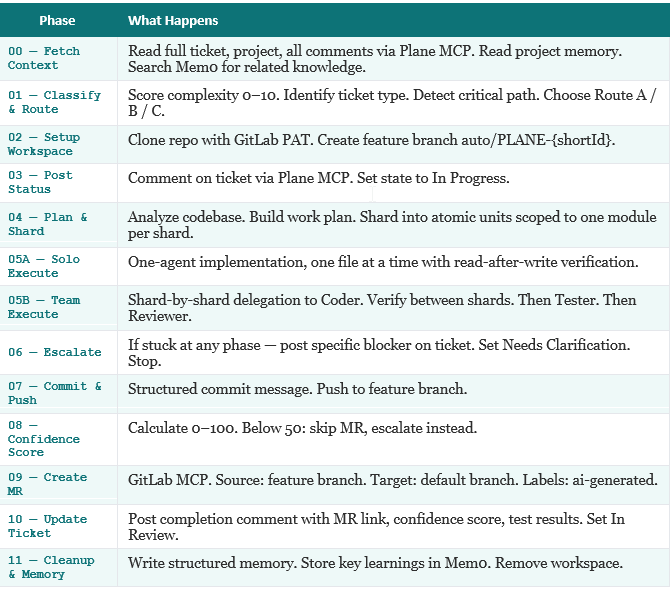
The 12 Pipeline Phases

Every ticket run goes through a structured sequence of phases, each tracked in the progress file:
Five Things That Actually Made the Difference

After multiple failed attempts and iterative improvement, these are the specific decisions that separate a working autonomous pipeline from one that produces unreliable output.

1. Progress Files Survive Everything

The agent writes state after every phase. If the session dies, if the context gets compacted, if a human follow-up restarts the run — the first thing the agent does is read claude-progress.txt. It knows exactly what phase it was in, what files it already changed, what approaches failed, and what is left to do.

Without this, a 54-minute autonomous run that dies at phase 7 starts over from scratch. With it, the agent picks up exactly where it left off.

2. Work Plan Sharding Prevents One-Shot Failures

The most common failure mode in autonomous coding agents is giving them too much at once. A 47-file work plan in a single context window means the agent has to hold everything in working memory simultaneously. It loses track, repeats edits, or hallucinates file paths.

Sharding into atomic units of 8–10 files, verified between each shard, produces dramatically cleaner output. If a shard fails, only that shard needs to be redone.

3. Hooks Beat Instructions — Every Time

A CLAUDE.md rule that says “never push directly to main” works approximately 70% of the time. A PreToolUse hook that intercepts the git push command and blocks it if the target branch is main works 100% of the time.

Deterministic enforcement via hooks, not probabilistic compliance via instructions. Rules are suggestions. Hooks are gates.

4. Structured Memory Has the WHY, Not Just the WHAT

A memory file that says “gotcha: don’t use express-slow-down” is nearly useless. The agent does not know if it was removed, never installed, or deprecated. It does not know what to use instead.

A memory entry that says “express-slow-down → NOT installed in this project, import fails at runtime → use express-rate-limit which is already in package.json dependencies” gives the agent everything it needs to make the right decision on the first attempt.

5. Read-After-Write Verification Catches Most Errors Early

After every file edit, the agent immediately reads the file back. It confirms the edit landed in the correct location. It checks that no syntax errors were introduced. It verifies that imports are still valid. Only then does it move to the next file.

This one pattern, applied consistently, eliminates the majority of cascading edit errors — where a broken change in file A causes failures in files B, C, and D, and the agent spends three retries trying to fix the wrong thing.

A Real Run: PropRadar

We shipped a complete project through the pipeline to validate it end-to-end. PropRadar is a property listing platform — React 18, Vite, React Router 6, plain CSS with a glassmorphism design system, and a full Playwright E2E test suite.

Two tickets were executed autonomously. Three sub-agents coordinated. One merge request was auto-created on GitLab with a Playwright test report attached.

The numbers from the run logs:

  • 532 events streamed to the live dashboard
  • 179 tool calls across all agents
  • 47 files changed across 5 pages and the test suite
  • 10 agent spawns (Orchestrator + Coder shards + Tester + Reviewer)
  • 54 minutes total wall-clock time
  • 100% of E2E tests passing in the final MR

The dashboard showed every single one of those tool calls in real time — which file was being read, which edit was being applied, which test was running, which phase the pipeline was in. Watching it run feels less like automated tooling and more like watching a small team work.

The Human Stays in the Loop — At Two Gates

This is worth being explicit about, because “autonomous” is a word that makes engineers nervous.

The pipeline has exactly two human gates:

  1. Gate 1: Ticket grooming. A human writes the ticket, adds acceptance criteria, and applies the ai-ready That label is the green light. Without clear acceptance criteria, the agent escalates and asks. Ambiguous tickets do not get auto-implemented — they get a question.
  2. Gate 2: MR approval. A human reviews the diff, checks the test results, reads the confidence score, and decides whether to merge. The CI/CD pipeline runs after merge. If something is wrong, it shows up at code review, not in production.

Everything between those two gates is autonomous. But the agent is not blindly confident — if it is unsure about anything at any point, it posts a specific question on the Plane ticket, sets the state to “Needs Clarification,” and stops. Human replies, webhook fires, agent resumes with –resume and the full conversation history as context.

The conversation happens where the work lives. Not in a separate chat window.

Why This Matters Now

Several products are building variations of this pipeline commercially — Pilot (by Quantflow), GitLab Duo Agent Platform with Claude, and others. Anthropic themselves shipped Auto Mode for Claude Code in early 2026, which handles multi-step workflows with reduced manual intervention.

The difference between what we built and those products is ownership. Our pipeline runs on our infrastructure, talks to our self-hosted Plane and GitLab instances, uses our existing Claude Code subscription via AWS Bedrock, and can be customized for our specific codebase patterns and safety requirements.

The capability is no longer exotic. The question every engineering team should be asking is not “can AI help with development?” — it clearly can. The question is: what does the harness around it look like, and how do you build it so it is safe, reliable, and actually useful on your real codebase?

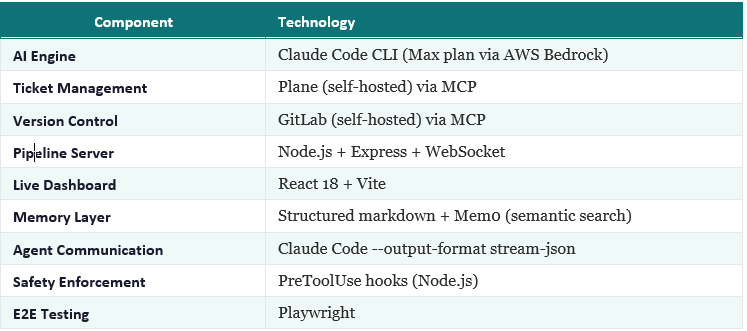
Technology Stack

Key Takeaways

  1. The AI is the easy part. The harness — memory, progress files, hooks, sharding, routing — is where pipelines succeed or fail.
  2. Progress files are non-negotiable. If your agent cannot resume from an interrupted run without repeating work, it will fail on any ticket that takes longer than one context window.
  3. Hooks are deterministic. Instructions are not. Safety-critical rules must be enforced in code, not in prompts.
  4. Structured memory with the WHY beats flat notes. The agent needs to know why an approach failed, not just that it did.
  5. Human judgment at two gates is the right model. Ticket grooming and MR approval. Not zero. Not twenty. Two.
Picture of TenshKumar k

TenshKumar k

A Software Engineer building agentic automation and AI-powered development workflows

NEWS LETTER

Happenings @Acheron